Frida —— WeChat(二) 🧧
为方便 hook 准备两份代码
0x01 环境
- Nexus 5X :
Android 8.1&BDOpener - WeChat : v7.0.0
- frida : v12.2.29
- frida-server : frida-server-12.2.29-android-arm64
0x02 关键流程分析
-
为方便 hook 准备两份代码
- jadx反编译的java分析代码逻辑
- apktool反编译后配合smalidea动态调试
-
无论是用ADM录制或是分析UI控件ID最后都很容易找到关键类
com.tencent.mm.plugin.luckymoney.ui.LuckyMoneyNotHookReceiveUI -
简单看一下onCreate函数,先根据
nativeurl检查是否有过缓存,如果是第一次接收就进入到最后的else分支中public void onCreate(Bundle bundle) {this.wXk = true;super.onCreate(bundle);if (VERSION.SDK_INT >= 21) {Window window = getWindow();window.addFlags(android.support.v4.widget.j.INVALID_ID);window.setStatusBarColor(getResources().getColor(c.transparent));}this.niJ = getIntent().getStringExtra("key_native_url");this.tQV = getIntent().getStringExtra("key_cropname");ab.i("MicroMsg.LuckyMoneyNotHookReceiveUI", "nativeUrl= " + bo.nullAsNil(this.niJ));initView();Uri parse = Uri.parse(bo.nullAsNil(this.niJ));try {this.niH = parse.getQueryParameter("sendid");} catch (Exception e) {}this.nla = com.tencent.mm.plugin.wallet_core.model.p.cDa().Ws(this.niJ);if (this.nla != null && this.nla.field_receiveAmount > 0 && bo.ei(this.nla.field_receiveTime) < 86400000) {ab.i("MicroMsg.LuckyMoneyNotHookReceiveUI", "use cache this item %s %s", Long.valueOf(this.nla.field_receiveTime), bo.nullAsNil(this.niJ));Intent intent = new Intent();intent.setClass(this.mController.wXL, LuckyMoneyBeforeDetailUI.class);intent.putExtra("key_native_url", this.nla.field_mNativeUrl);intent.putExtra("key_sendid", this.niH);intent.putExtra("key_anim_slide", true);startActivity(intent);finish();} else if (bo.isNullOrNil(this.niH)) {finish();ab.w("MicroMsg.LuckyMoneyNotHookReceiveUI", "sendid null & finish");} else {int i = bo.getInt(parse.getQueryParameter("channelid"), 1);this.mdL = parse.getQueryParameter("sendusername");b(new ao(i, this.niH, this.niJ, getIntent().getIntExtra("key_way", 0), "v1.0"), false);if (this.tipDialog != null) {this.tipDialog.show();}}}最重要的是这段代码,参数
niH->sendid,niJ->key_native_url均是从上面获取得到,b是网络请求(稍后分析),先跟入aob(new ao(i, this.niH, this.niJ, getIntent().getIntExtra("key_way", 0), "v1.0"), false); -
在ao中可以看到回调函数a主要是填充各种参数,尤其是
timingIdentifierpublic final void a(int i, String str, JSONObject jSONObject) {as asVar;this.nfm = jSONObject.optString("sendNick");this.ndv = jSONObject.optString("sendHeadImg");this.cBQ = jSONObject.optInt("hbStatus");this.cBR = jSONObject.optInt("receiveStatus");this.nds = jSONObject.optString("statusMess");this.mYH = jSONObject.optString("wishing");this.ndD = jSONObject.optInt("isSender");this.nfn = jSONObject.optLong("sceneAmount");this.nfo = jSONObject.optLong("sceneRecTimeStamp");this.ndr = jSONObject.optInt("hbType");this.ndK = jSONObject.optString("watermark");this.naN = jSONObject.optString("externMess");this.ndP = jSONObject.optString("sendUserName");if (!bo.isNullOrNil(this.ndP) && bo.isNullOrNil(this.nfm)) {this.nfm = ((b) g.L(b.class)).ih(this.ndP);}this.ndJ = u.T(jSONObject.optJSONObject("operationTail"));this.neX = jSONObject.optInt("scenePicSwitch");JSONObject optJSONObject = jSONObject.optJSONObject("agree_duty");if (optJSONObject != null) {this.neI = optJSONObject.optString("agreed_flag", "-1");this.neJ = optJSONObject.optString("title", "");this.neK = optJSONObject.optString("service_protocol_wording", "");this.neL = optJSONObject.optString("service_protocol_url", "");this.neM = optJSONObject.optString("button_wording", "");this.neN = optJSONObject.optLong("delay_expired_time", 0);}if (this.neN > 0) {g.MI();g.MH().Mr().set(a.USERINFO_WALLET_REALNAME_DISCLAIMER_QUERY_EXPIRED_TIME_LONG_SYNC, Long.valueOf(System.currentTimeMillis() + (this.neN * 1000)));}ab.i("MicroMsg.NetSceneReceiveLuckyMoney", "scenePicSwitch:" + this.neX);this.nfp = jSONObject.optInt("preStrainFlag", 1);ab.i("MicroMsg.NetSceneReceiveLuckyMoney", "preStrainFlag:" + this.nfp);g.MI();g.MH().Mr().set(a.USERINFO_NEWYEAR_HONGBAO_IMAGE_PRESTRAIN_FLAG_INT_SYNC, Integer.valueOf(this.nfp));this.nfq = jSONObject.optString("timingIdentifier");this.eLj = jSONObject.optString("effectResource");JSONObject optJSONObject2 = jSONObject.optJSONObject("showSourceRec");if (optJSONObject2 == null) {asVar = null;} else {asVar = new as();asVar.nfv = u.U(optJSONObject2);}this.nfr = asVar;} -
回来继续查看onClick触发的流程,

对照下代码确定是函数c,触发onClick后会再次调用b进行网络请求,但这次是为al
public final boolean c(int i, int i2, String str, m mVar) {if (!(mVar instanceof ao)) {if (mVar instanceof al) {...} else if (mVar instanceof ae) {...}return false;} else if (i == 0 && i2 == 0) {this.nfx = (ao) mVar;com.tencent.mm.plugin.report.service.h.paF.f(11701, Integer.valueOf(5), Integer.valueOf(wA(this.nfx.ndr)), Integer.valueOf(bCN()), Integer.valueOf(0), Integer.valueOf(1));z zVar = new z();zVar.field_mNativeUrl = this.niJ;zVar.field_hbType = this.nfx.ndr;zVar.field_hbStatus = this.nfx.cBQ;zVar.field_receiveStatus = this.nfx.cBR;com.tencent.mm.plugin.wallet_core.model.p.cDa().a(zVar);if (this.nfx.cBR == 2) {b(new ae(this.niH, 11, 0, this.niJ, "v1.0"), false);} else {w.b(this.mZq, this.nfx.ndv, this.nfx.ndP);w.a(this.mController.wXL, this.nah, this.nfx.nfm);boolean z = false;if (this.nfx.cBR == 1 || this.nfx.cBQ == 4 || this.nfx.cBQ == 5 || this.nfx.cBQ == 1) {...} else {if (!bo.isNullOrNil(this.nfx.nds)) {this.nkW.setText(this.nfx.nds);this.nkW.setVisibility(0);}if (!bo.isNullOrNil(this.nfx.mYH)) {w.a(this.mController.wXL, this.nkX, this.nfx.mYH);this.nkX.setVisibility(0);this.nkW.setVisibility(8);}this.nai.setOnClickListener(new OnClickListener() {public final void onClick(View view) {com.tencent.mm.plugin.report.service.h.paF.f(11701, Integer.valueOf(5), Integer.valueOf(LuckyMoneyNotHookReceiveUI.wA(LuckyMoneyNotHookReceiveUI.this.nfx.ndr)), Integer.valueOf(LuckyMoneyNotHookReceiveUI.this.bCN()), Integer.valueOf(0), Integer.valueOf(2));LuckyMoneyNotHookReceiveUI luckyMoneyNotHookReceiveUI = LuckyMoneyNotHookReceiveUI.this;luckyMoneyNotHookReceiveUI.b(new al(luckyMoneyNotHookReceiveUI.nfx.msgType, luckyMoneyNotHookReceiveUI.nfx.bRa, luckyMoneyNotHookReceiveUI.nfx.mZB, luckyMoneyNotHookReceiveUI.nfx.cBP, w.bBN(), q.SQ(), luckyMoneyNotHookReceiveUI.getIntent().getStringExtra("key_username"), "v1.0", luckyMoneyNotHookReceiveUI.nfx.nfq), false);w.c(luckyMoneyNotHookReceiveUI.nai);}});...主要看下al初始化需要的参数,其中在UI初始化时,定义有
ao nfx,对应的变量都能轻松找到,唯一特殊的就是nfx.nfqal(luckyMoneyNotHookReceiveUI.nfx.msgType,luckyMoneyNotHookReceiveUI.nfx.bRa,luckyMoneyNotHookReceiveUI.nfx.mZB,luckyMoneyNotHookReceiveUI.nfx.cBP, w.bBN(), q.SQ(),luckyMoneyNotHookReceiveUI.getIntent().getStringExtra("key_username"),"v1.0",luckyMoneyNotHookReceiveUI.nfx.nfq)在4中可以看到有
this.nfq = jSONObject.optString("timingIdentifier");之所以这么写,是由于新版微信取消了一次性请求拆红包,改为先向服务器请求时间身份再二次请求拆红包
-
简单地说就是收到红包后先包装ao请求timingIdentifier,在拼接到al中请求拆红包,现在就缺少
完整的参数和网络请求函数即可拼接自动抢红包动作 -
由于微信是将所有的信息都存入到数据库中,可通过监听
com.tencent.wcdb.database.SQLiteDatabase#insert查看参数值,而timingIdentifier可通过hookcom.tencent.mm.plugin.luckymoney.c.ao#a获取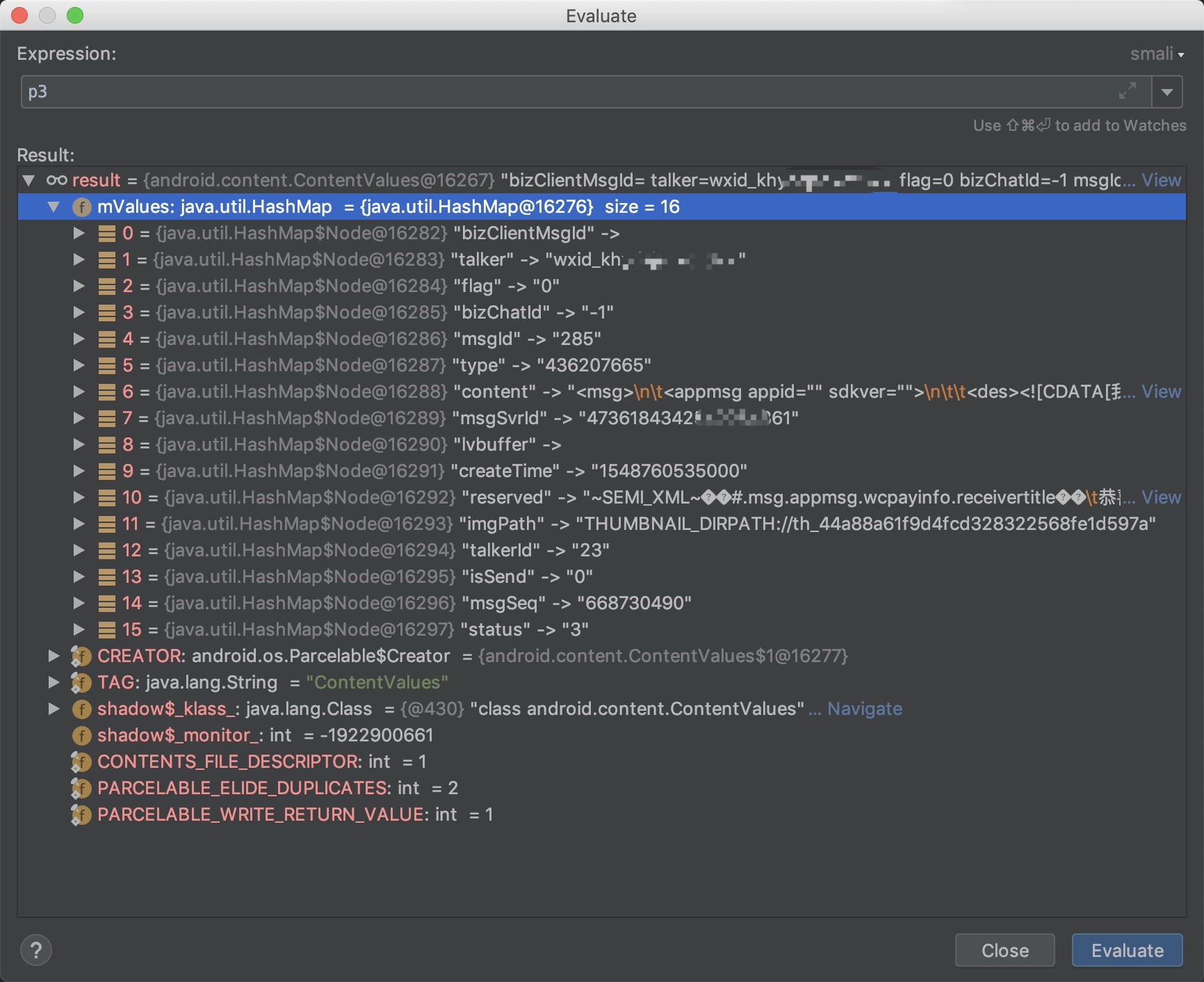
通过监听insert的获取红包时的参数分析如下
| key | sign | value |
|---|---|---|
| talker | 来源 | 用户:<user_id> — 群组:<room_id>@chatroom |
| type | 类型 | 红包:436207665、 — 转账:419430449 |
| isSend | 是否为发送方 | 本人发送:1 — 他人发送:0 |
| status | 消息状态 | 未领取:3 — 已领取:4 |
| content | 内容 | 交易具体内容 |
-
content消息大致如下(手动马赛克;3)
<msg><appmsg appid="" sdkver=""><des><![CDATA[我给你发了一个红包,赶紧去拆!]]></des><url><![CDATA[https://wxapp.tenpay.com/mmpayhb/wxhb_personalreceive?showwxpaytitle=1&msgtype=1&channelid=1&sendid=10000395******************07523&ver=6&sign=5155e62fb15aae89e384499115fc20******a0cf2ebd******a6fa3ca741d0f716924245c39a8******776207d760fe3d7ff0b08782******84e0b240e7cf07005f18a5bd5b7888aea379a0de06a3fb4]]></url><type><![CDATA[2001]]></type><title><![CDATA[微信红包]]></title><thumburl><![CDATA[https://wx.gtimg.com/hongbao/1800/hb.png]]></thumburl><wcpayinfo><templateid><![CDATA[7a2a165d31da************c300028a]]></templateid><url><![CDATA[https://wxapp.tenpay.com/mmpayhb/wxhb_personalreceive?showwxpaytitle=1&msgtype=1&channelid=1&sendid=10000395******************07523&ver=6&sign=5155e62fb15aae89e384499115fc20******a0cf2ebd******a6fa3ca741d0f716924245c39a8******776207d760fe3d7ff0b08782******84e0b240e7cf07005f18a5bd5b7888aea379a0de06a3fb4]]></url><iconurl><![CDATA[https://wx.gtimg.com/hongbao/1800/hb.png]]></iconurl><receivertitle><![CDATA[恭喜发财,大吉大利]]></receivertitle><sendertitle><![CDATA[恭喜发财,大吉大利]]></sendertitle><scenetext><![CDATA[微信红包]]></scenetext><senderdes><![CDATA[查看红包]]></senderdes><receiverdes><![CDATA[领取红包]]></receiverdes><nativeurl><![CDATA[wxpay://c2cbizmessagehandler/hongbao/receivehongbao?msgtype=1&channelid=1&sendid=10000395******************07523&sendusername=wxid_khyda******622&ver=6&sign=5155e62fb15aae89e384499115fc20******a0cf2ebd******a6fa3ca741d0f716924245c39a8******776207d760fe3d7ff0b08782******84e0b240e7cf07005f18a5bd5b7888aea379a0de06a3fb4]]></nativeurl><sceneid><![CDATA[1002]]></sceneid><innertype><![CDATA[0]]></innertype><paymsgid><![CDATA[10000395******************07523]]></paymsgid><scenetext>微信红包</scenetext><locallogoicon><![CDATA[c2c_hongbao_icon_cn]]></locallogoicon><invalidtime><![CDATA[1548475772]]></invalidtime><broaden /></wcpayinfo></appmsg><fromusername><![CDATA[wxid_khyda******622]]></fromusername></msg> -
网络请求函数b可逐步跟入,这里g.MG().epW即是关键类
com.tencent.mm.plugin.luckymoney.c.r public final void b(m mVar, boolean z) {ab.d("MicroMsg.WalletNetSceneMgr", "isShowProgress ".concat(String.valueOf(z)));l(mVar);this.gnx.add(mVar);if (z && (this.tipDialog == null || !(this.tipDialog == null || this.tipDialog.isShowing()))) {if (this.tipDialog != null) {this.tipDialog.dismiss();}this.tipDialog = h.a(this.mContext, 3, this.mContext.getString(i.loading_tips), true, new OnCancelListener() {public final void onCancel(DialogInterface dialogInterface) {if (r.this.tipDialog != null && r.this.gnw.isEmpty()) {r.this.tipDialog.dismiss();Iterator it = r.this.gnx.iterator();while (it.hasNext()) {m mVar = (m) it.next();g.MI();g.MG().epW.c(mVar);}r.this.gnx.clear();}}});}g.MI();g.MG().epW.a(mVar, 0);}可以通过下面的frida代码获取到网络请求类,并调用a函数
Network = Java.use('com.tencent.mm.kernel.g').MG().epW;Network.a(..., ...);还有另一种方法,查找任何类似
return ****g.MG().epW;的调用,可通过com.tencent.mm.model.av#LZ直接返回网络请求类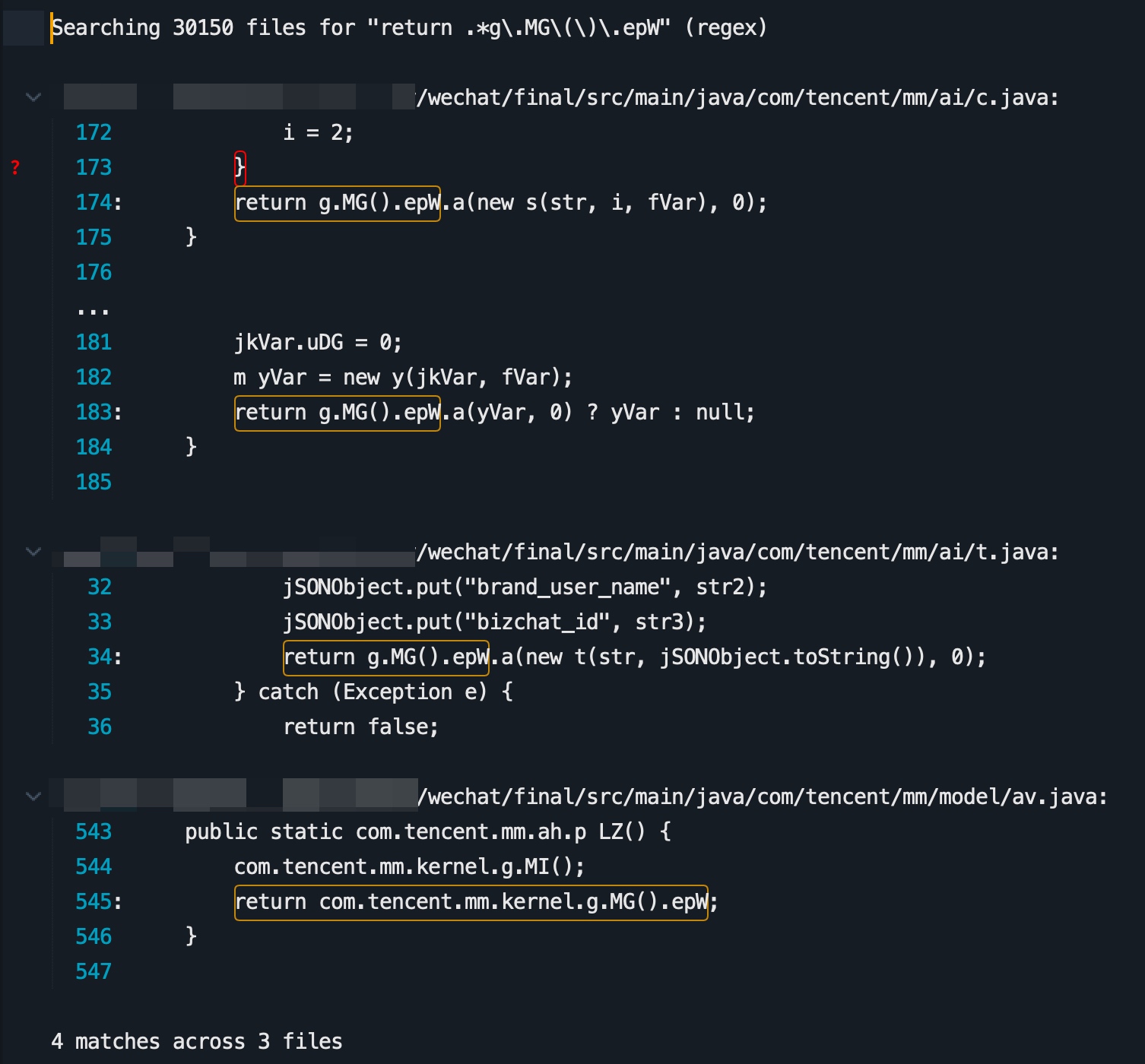 Network = Java.use('com.tencent.mm.model.av').LZ();Network.a(..., ...);
 -
流程梳理下
监听insert获取参数 -> 打包ao并请求 -> 监听ao.a获取timingIdentifier -> 打包al并请求
0x03 Poc
var requestList = [];setImmediate(function () {    Java.perform(function(){        // 声明全局获取网络请求函数        Network = Java.use('com.tencent.mm.model.av').LZ();        // 或 Network = Java.use('com.tencent.mm.kernel.g').MG().epW;        // 请求时间认证并通过回调函数接收        ReceiveLuckMoneyRequest = Java.use('com.tencent.mm.plugin.luckymoney.c.ao');        // 请求拆红包        LuckMoneyRequest = Java.use('com.tencent.mm.plugin.luckymoney.c.al');        // 获取插入数据库动作时的参数        var sqlClass = Java.use('com.tencent.wcdb.database.SQLiteDatabase');      sqlClass.insert.implementation = function (a1,a2,a3) {          // 如果为红包且未领取          if (a3.getAsInteger('type') == 436207665 && a3.getAsInteger('status') == 3) {            handleSqlMessage(a3.getAsString('content'));          }          return this.insert(a1,a2,a3);        }        // 第一次请求的回调函数        ReceiveLuckMoneyRequest.a.overload('int', 'java.lang.String', 'org.json.JSONObject').implementation = function (a1,a2,a3) {            if (a2 == 'ok') {                handleReceivelMessage(a3);            }            return this.a(a1,a2,a3);        }    });});
// 从content中解析参数值function handleSqlMessage(mVar) {    console.log('[!] 收到一个红包,正在抢夺中')    // 解析参数    info = parseContent(mVar);    // 构建请求timingIdentifier,第4个参数抓包为1,但是基本文章里都写0?    var request = ReceiveLuckMoneyRequest.$new(parseInt(info.channelid), info.sendid, info.nativeurl, 0, "v1.0");    var response = Network.a(request, 0);    if (response) {        requestList[info.sendid] = info;    }}
// 从xmlString中解析出nativeurl和其中的参数function parseContent(mString) {    var info = {}    // 正则获取nativeurl    info.nativeurl = mString.match(/<nativeurl><!\[CDATA\[(.*?)\]\]><\/nativeurl>/)[1];    // 解析nativeurl中的参数    var paramsString = info.nativeurl.split('?')[1].split('&');    for (var i=0; i<paramsString.length; i++) {        var param = paramsString[i].split('=');        info[param[0]] = param[1];    }    return info;}
// 解析时间认证值,并发送请求拆红包function handleReceivelMessage(jsonObject) {    // 获取时间认证    var timingIdentifier = jsonObject.get('timingIdentifier');    var sendid = jsonObject.get('sendId');    if (sendid in requestList) {        var info = requestList[sendid];        delete requestList[sendid];        // 第6个参数应该是用户名(为空可能容易被判断为外挂),第7个参数是用户id        var request = LuckMoneyRequest.$new(1, parseInt(info.channelid), info.sendid, info.nativeurl, "", "", info.sendusername, "v1.0", timingIdentifier);        response = Network.a(request, 0);        console.log("[*] 抢红包成功:", response);    }}
效果
> frida -U com.tencent.mm -l redEnvelope.js     ____    / _  |   Frida 12.2.29 - A world-class dynamic instrumentation toolkit   | (_| |    > _  |   Commands:   /_/ |_|       help      -> Displays the help system   . . . .       object?   -> Display information about 'object'   . . . .       exit/quit -> Exit   . . . .   . . . .   More info at http://www.frida.re/docs/home/
[LGE Nexus 5X::com.tencent.mm]-> [!] 收到一个红包,正在抢夺中[*] 抢红包成功: true